Your product page is where a visitor decides to buy or leave. Most store owners spend money on ads and email to bring people in. Then small problems on the product page quietly send those people away.
These problems hurt most on variable products. A t-shirt in 5 colours and 6 sizes has 30 versions. If customers can’t see those options clearly, they guess, get confused, or give up.
The good news: each problem has a simple fix. In this guide you’ll learn 6 common product page problems, why each one costs you sales, and how two plugins fix them.
The 6 problems at a glance
| Problem | What customers feel | The fix |
|---|---|---|
| 1. Options hidden in dropdowns | “I can’t see what colours you have” | Colour, image and button swatches |
| 2. Sold-out options look available | “I picked one and it’s not in stock?” | Blur or hide out-of-stock variations |
| 3. Shop page hides the options | “I didn’t know it came in blue” | Swatches on shop and category pages |
| 4. No way to share an exact variation | “Which one did my friend send me?” | Direct variation links |
| 5. Photos don’t match the chosen variation | “Is this what I’ll get?” | A full image gallery per variation |
| 6. No video for variations | “How does it look in real life?” | Video per variation |
Problems 1 to 4 are fixed with Variation Swatches for WooCommerce. Problems 5 and 6 are fixed with Additional Variation Images Gallery for WooCommerce. Both come from GetWooPlugins.
Part 1: Problems you can fix with Variation Swatches
Problem 1: Your options are hidden in dropdowns
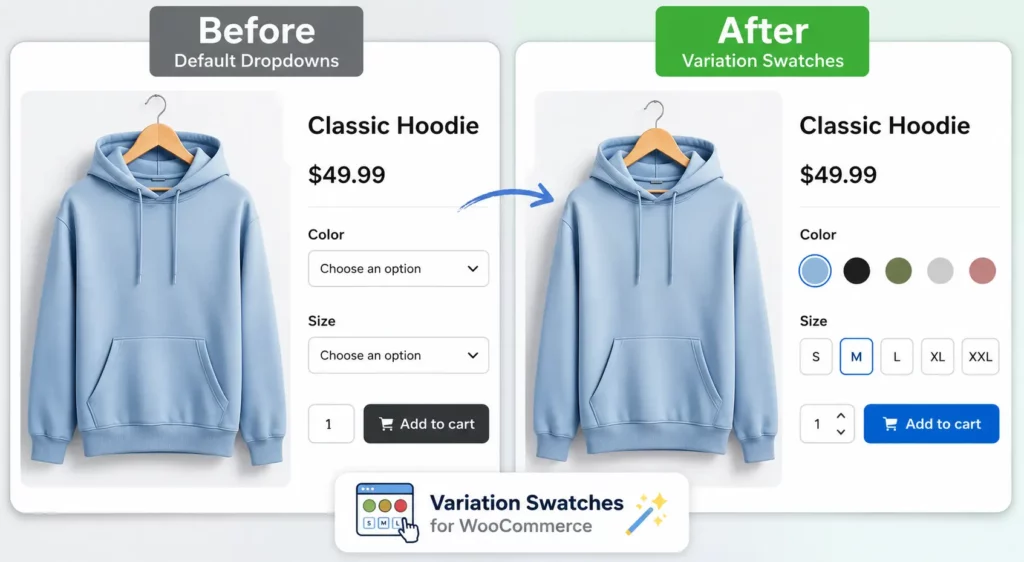
Most stores show variations in a plain dropdown menu. A customer has to click “Choose an option” just to see which colours exist. On a phone, that means tapping a small box and scrolling a plain text list.
Why it costs you sales: customers buy with their eyes. “Navy” and “Midnight” are just words in a list. A small round swatch of each colour shows the difference at once. When people have to work to see options, many don’t bother.
The fix: replace the dropdown with swatches. Variation Swatches for WooCommerce turns each option into a clickable colour, image or button. Customers see every choice before they click anything.
A few useful touches:
- Auto image swatches: if a variation already has a featured image, the plugin can use it as the swatch. No extra uploads.
- Tooltips: show the option name or a larger image when a customer hovers.
- Rounded or square shapes to match your theme.
- Per-product control: set global styles once, then change them for a single product when needed.
Problem 2: Sold-out options look available
A customer picks a colour, then a size, and only then finds out it’s out of stock. That’s frustrating. Do it twice and they leave.
The fix: with swatches, sold-out options can be blurred (with a cross over them) or hidden completely. You’ll find this under Swatches Settings, Advanced, Attribute Behavior. It is one global setting for the whole store.
[Image: out-of-stock-blurred-swatch.jpg | Alt: Out-of-stock variation blurred with a cross in WooCommerce
Be aware of the limits:
- Free version: works for products with up to about 30 variations, and needs the WooCommerce “Hide out of stock items from the catalog” setting turned on.
- Pro version: works with any number of variations, and does not need that catalog setting.
Want to see it in action? Try the out-of-stock demo with more than 30 variations.
Problem 3: The shop page hides your options
On most shop and category pages, a variable product shows one photo and a “Select options” button. A customer looking for a green jacket scrolls right past yours, because they never see that it comes in green.
Why it costs you sales: the shop page is where customers decide which products to click. If your options are invisible there, you lose the click before the product page even loads.
The fix: Variation Swatches can show swatches right under each product on shop, category and archive pages. Customers can click a colour and see the product image change before opening the page. A “More” link keeps rows tidy when a product has many options, and you can show just one attribute (like colour) to keep things clean.
The Pro version also turns the WooCommerce “Filter Products by Attribute” widget into swatches, so customers can filter by colour visually.
Problem 4: Customers can’t share the exact variation
A customer finds the perfect red dress in size M and sends the link to a friend. The friend opens it and sees the default black one. Now they have to find red and M again.
The same thing happens with your own marketing. If you promote one colour in an email or ad, customers should land on that colour, not the default.
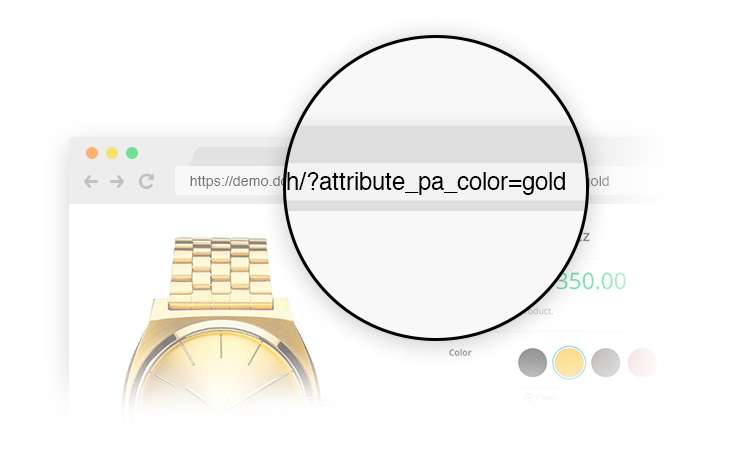
The fix: Variation Swatches can generate a direct variation link that opens the product with the right options already selected. Use it in emails, social posts and ads.
Variation Swatches at a glance
- 300,000+ active installs and a 4.8 out of 5 rating on WordPress.org
- Works with popular themes like Flatsome, Astra, Divi, Blocksy, OceanWP and WoodMart
- Free version: Variation Swatches on WordPress.org
- See it live: Variation Swatches demo
- Full feature list and Pro plans: Variation Swatches for WooCommerce
Black Friday & Cyber Monday: Variation Swatches Pro is 50% off with code FRIDAY50 until 30 December 2026. See the deal
Part 2: Problems you can fix with Variation Gallery
Problem 5: The photos don’t match the chosen variation
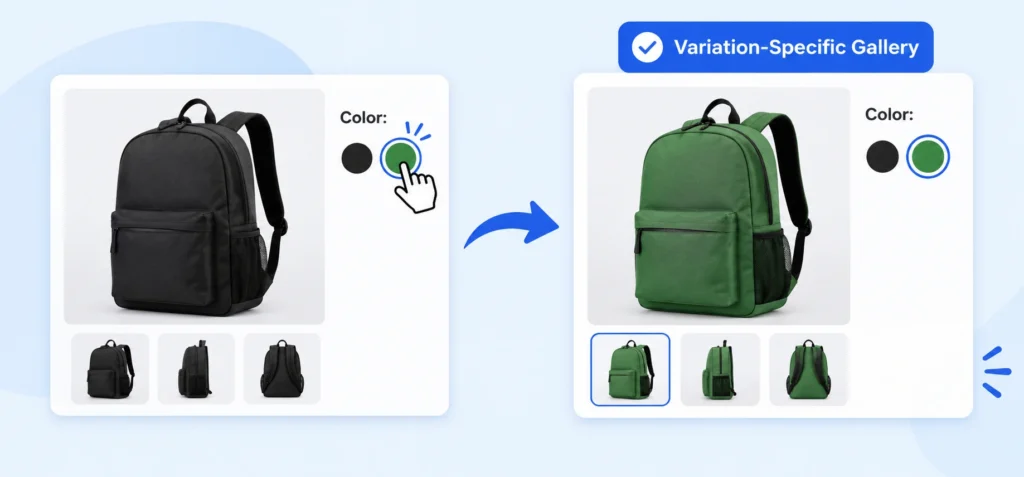
A customer picks the green version of your bag. The main photo changes to green, but every other photo in the gallery still shows the black one. Now they’re unsure what the green bag looks like from the side, the back, or inside.
Why it costs you sales: customers want to see exactly what they’re paying for. When the photos don’t match their choice, doubt creeps in, and doubt leads to abandoned carts and returns.
The fix: Additional Variation Images Gallery for WooCommerce gives each variation its own gallery. When a customer picks a variation, every photo in the gallery changes to match. It also gives you control over how the gallery looks and behaves:
- Thumbnail position: left, right or below the main image
- Slider or grid thumbnails, with 4 to 8 thumbnails per row
- Image zoom and a lightbox popup for a closer look
- Responsive gallery width for large, medium and small screens
- Automatic slide to the right images when a customer changes variation
- Drag-and-drop sorting and multi-select upload from the media library
- Gallery export and import, handy when you move or rebuild a store
Switching from another gallery tool? Recent versions of the plugin include a migration option to bring your existing variation images across.
Problem 6: No video for your variations
Photos show what a product looks like. Video shows how it moves, fits and works: how a fabric drapes, how a shoe flexes, how a lamp lights up a room. For many products, a short clip answers questions that ten photos can’t.
Why it costs you sales: customers can’t touch the product. Video is the closest thing. Without it, they rely on guesswork and reviews.
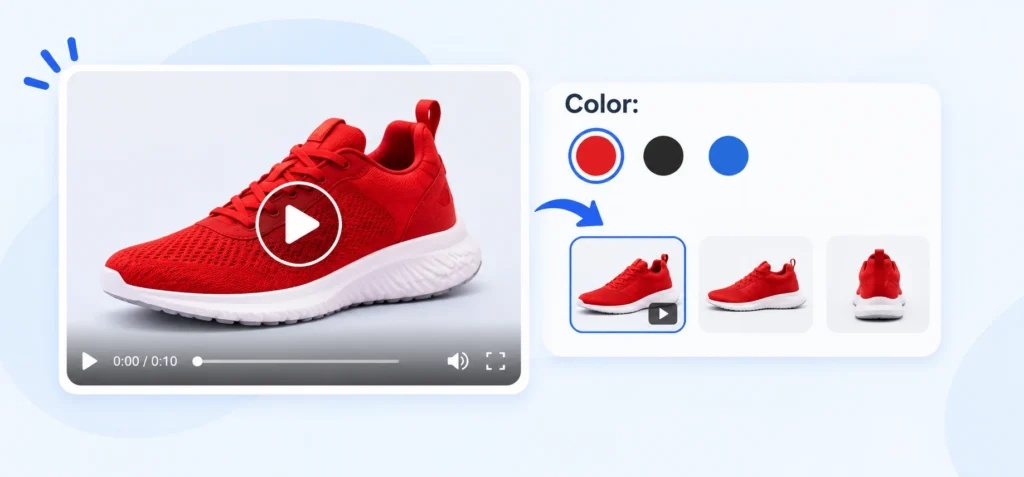
The fix: the Variation Gallery plugin lets you add video to each variation, so the red sneaker shows a red sneaker video:
- YouTube, Vimeo or self-hosted video per variation
- Featured video on simple, variable, grouped and external products
- Video poster images, so customers see a clean cover frame before pressing play
- Video width and height control to remove black bars
Variation Gallery at a glance
- 30,000+ active installs on WordPress.org
- Free version: Additional Variation Images Gallery on WordPress.org
- See it live: Variation Gallery demo
- Full feature list and Pro plans: Additional Variation Images Gallery for WooCommerce
Black Friday & Cyber Monday: Variation Gallery Pro is 50% off with code FRIDAY50 until 30 December 2026. See the deal
Quick checklist for your product pages
Open your best-selling variable product on your phone and check:
- ☐ Can I see every colour or style without opening a dropdown?
- ☐ Are sold-out options clearly marked or hidden?
- ☐ Does the shop page show which options exist?
- ☐ Can I share a link to one exact variation?
- ☐ Do all the photos change when I pick a different variation?
- ☐ Is there a video for products that are hard to judge from photos?
Every “no” is a place where customers may be leaving. Fix the top one first, then work down the list.
FAQ
What are variation swatches in WooCommerce?
They are clickable colour, image or button options that replace the default dropdown on variable products. Customers see every option at a glance.
Can I add video to product variations?
Yes. Variation Gallery lets you add YouTube, Vimeo or self-hosted video to each variation, plus a featured video on simple, variable, grouped and external products.
Will swatches slow down my store?
Swatches are small images and styled buttons. Like any plugin, test on a staging site first and check your page speed before and after.
Is there a free version of these plugins?
Yes. Both Variation Swatches and Variation Gallery have free versions on WordPress.org. The Pro versions add more features, plus updates and support for the length of your licence.
Do the plugins work with my theme?
Variation Swatches lists support for many popular themes, including Flatsome, Astra, Divi, Blocksy, OceanWP and WoodMart. Try the free version first to check.